Google keyword planer overview

Free Keyword Research Tools You Should Be Using in 2026

In the initial stage of SEO, it is quite difficult for all to invest in expensive keyword research tools. People find something free that serves their purpose, and there is nothing to be ashamed of. We all have done that, right? 

But here is the thing: keyword research has changed quite a bit. With AI search engines like ChatGPT, Perplexity, and Google’s AI Overviews now influencing how people find information, picking the right keywords is not just about ranking on Google anymore. You need to think a little wider than that.

In this blog, I am going to tell you how to do keyword research in 2026 and which free keyword research tools you can use to start your SEO journey.

But First, You Should Know What a Keyword Is.

It is not as complicated as it sounds. You just need a clear process.

Start with a topic first. You can find topic ideas from Reddit threads, YouTube’s autocomplete feature, Google’s “People Also Ask” section, or just by typing a word slowly into Google in incognito mode and watching what suggestions pop up. Those autocomplete suggestions are Google telling you exactly what people are searching for right now — and that is genuinely useful data.

Then use a keyword tool to dig deeper. Once you have a topic, plug it into a keyword research tool and look at these core metrics:

  • Search Volume — How many times, on average, people search for that keyword per month. Higher volume means more potential traffic.
  • Keyword Difficulty (KD) — How hard it will be for your site to rank on page one. The lower the number, the better your chances.
  • Cost Per Click (CPC) — What advertisers pay for a click on that keyword. High CPC often means the keyword has commercial value.
  • Search Trends — Whether interest in the keyword is growing, shrinking, or staying steady over time.

You will also want to check search intent — basically, why someone is searching for that term. Is the person looking for information? Comparing products before buying? Ready to purchase? Trying to find a specific website? Matching your content to the right intent matters more than most beginners realise.

Quick tip for beginners: Go after long-tail keywords — phrases with four or more words. “Running shoes” is hard to rank for. “Running shoes for flat feet women” is much more specific, has less competition, and connects you with someone who actually knows what they want. That usually means better engagement and more conversions too.

The Best Free Keyword Research Tools in 2026

Here are the tools worth your time right now.

1. Google Keyword Planner

This is Google’s own keyword tool, and it is free — though you will need a Google Ads account to use it. It was originally built for paid advertising, but it is still useful for SEO if you know how to read it.

Google keyword planer overview

You can get monthly search volume estimates, competition levels, CPC ranges, and year-over-year changes. The tool also generates hundreds of keyword ideas quickly based on a seed keyword or your website.

Keyword planner

The downside I keep running into: it does not give you precise search volume numbers. Instead of saying a keyword gets 4,500 searches a month, it shows you a range like “1k–10k.” That is fine for running ads, but for SEO purposes, it makes it harder to compare and prioritise keywords properly. For that reason, I would always pair this with another tool.

2. Answer The Public

This is one of my favourite tools — not just because it is free, but because of how it presents data.

Instead of giving you a plain list of keywords, Answer The Public builds visual maps showing all the questions, comparisons, and preposition-based searches related to your topic. So if your keyword is “running shoes,” you get breakdowns like “running shoes for flat feet,” “running shoes vs. trainers,” “best running shoes for beginners” — organised in a way that sparks a lot of content ideas fast.
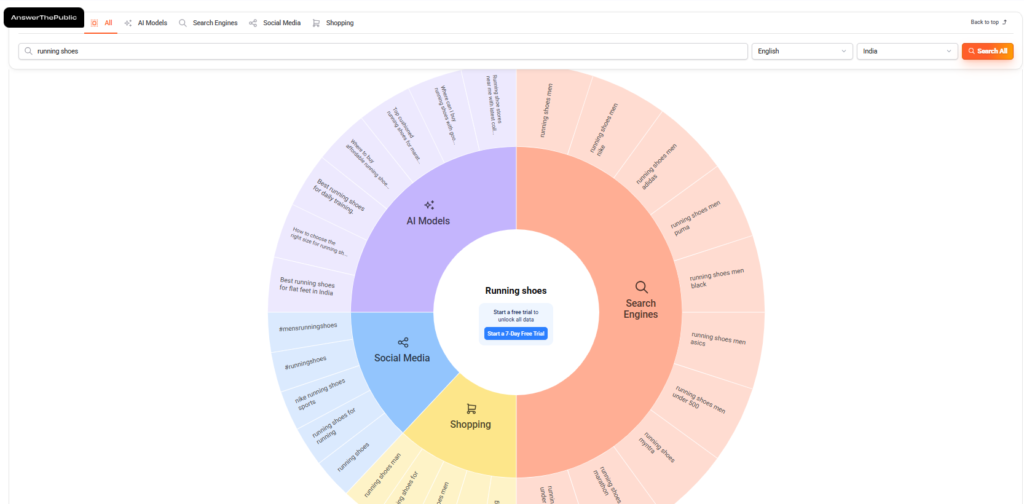
Answer the public keyword overview

It pulls data from Google, Bing, and YouTube, and it is particularly good for finding question-based keywords — the kind that work well in FAQs, blog posts, and “People Also Ask” answers.

The limitation is the daily search cap on the free plan (3 searches per day per account). My workaround: use multiple Google accounts. Works well enough when you just need to do quick research sessions.

3. Ahrefs

Ahrefs is one of the biggest names in SEO, and their free Keyword Generator tool gives you a solid peek at what their full platform offers.

You can enter a seed keyword and get search volume, keyword difficulty, global search volume, number of clicks per search, and traffic potential. It covers Google, Bing, YouTube, and Amazon — which is useful depending on what you are optimising for.

The catch is that the free version limits you to the top 10 results for most metrics. If you want to go deeper, you will need to pay for one of their plans. But for getting a quick sense of a keyword’s difficulty and volume in your target country, it does the job.

One thing missing in the free version: search intent data. You will not see whether a keyword is informational or transactional, so keep that in mind.

4. Google Trends

Google Trends is free, and a lot of people sleep on it. I think it is genuinely useful — just not as a standalone tool.

It shows you how search interest for a topic has changed over time. You can compare keywords against each other, filter by location, and look at related trending queries. The “Interest over time” graph quickly tells you whether a keyword is growing in popularity, declining, or seasonal.

Where it falls short is that it does not give you actual search volume numbers. So you can see that a keyword is trending upward, but you cannot tell if it gets 500 searches a month or 50,000. That is why I always pair Google Trends with one of the other tools on this list — use it to validate direction, then use something like Keyword Planner or Ahrefs to check the actual numbers.

5. Keyword Intent

This is a completely free tool with a clean, easy-to-use interface — and it has a few features that make it stand out from the others.

First, you can filter your search by type: questions, comparisons, how-tos, ideas, and more. That is handy when you already know what kind of content you want to create and just need the right keywords to match.

Second, there is a language filter. Not many free tools give you that option, but if you are targeting non-English markets or multilingual audiences, it is a genuinely useful feature.

You get standard metrics — search volume, keyword difficulty, CPC — plus a 12-month trend graph. There is no daily search limit either, which is a big plus if you are doing extended keyword research sessions. Overall, this is a solid starting point for beginners.

6. Google Search Console

This one is completely free and, honestly, one of the most underused tools out there. If you have a website already, Google Search Console should be set up before anything else.

What makes it valuable is that it shows you which keywords your pages are already ranking for, how many impressions and clicks you are getting, and where your average position sits for each query. That information is gold. Instead of guessing what might work, you are working with real data from your actual site.
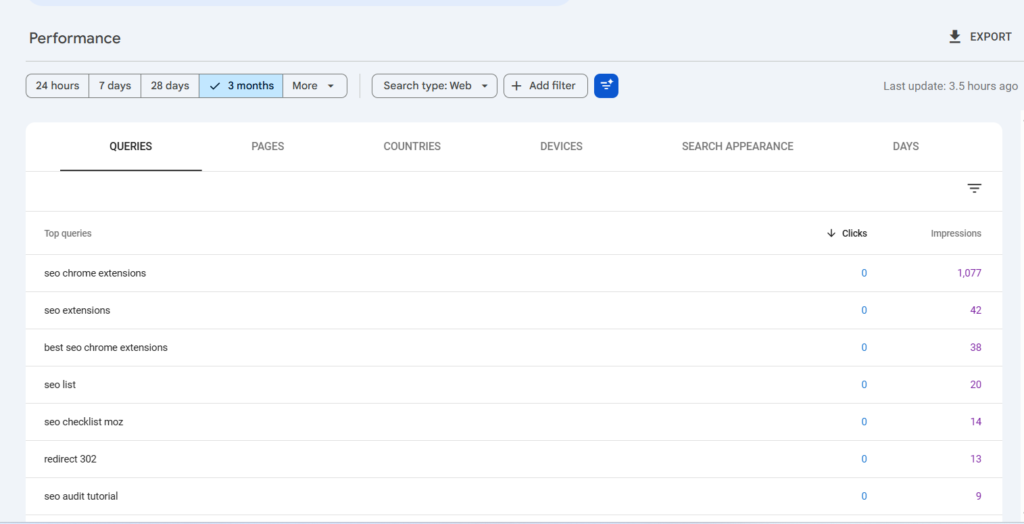
Google search console performance

It is not the best for finding brand new keyword ideas from scratch, but for analysing and improving what you are already doing, nothing beats it.

7. Answer Socrates

Think of this as Answer The Public’s newer, more data-heavy cousin. It is completely free and pulls together keyword questions from across Google, including “People Also Ask” results, which are showing up more and more in search results these days.

What I find useful about it is the topic clustering — it groups related questions together, so you get a much clearer picture of the different angles people are taking around your topic. It also pulls in Google Trends data alongside the keyword questions, so you can see whether interest is rising or falling.
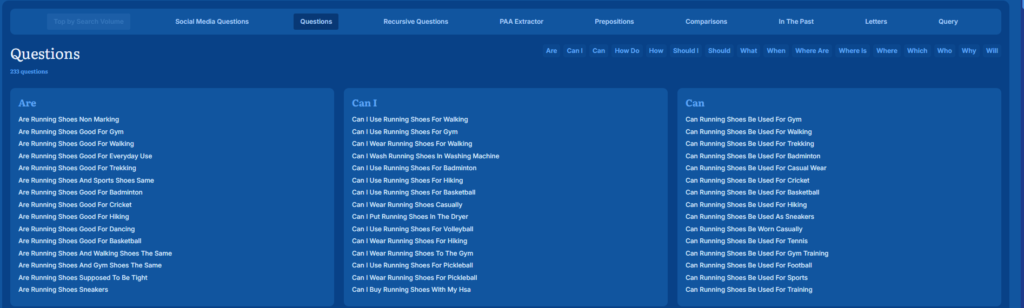
If you are building out a content strategy around question-based keywords, Answer Socrates is worth adding to your regular toolkit.

A Simple Workflow That Actually Works

Rather than picking one tool and sticking to it, here is a simple process that gets better results:

  1. Google Autocomplete (incognito mode) — Type your topic slowly and note the suggestions. These are real searches people are doing right now.
  2. Answer The Public or Answer Socrates — Go deeper on question-based keywords and content angles.
  3. Ahrefs Free Generator or Keyword Intent — Check search volume and keyword difficulty.
  4. Google Trends — Confirm whether interest in the keyword is growing or fading.
  5. Google Search Console — For your existing site, always check what keywords you are already close to ranking for. A little optimisation on a page sitting at position 8–15 can get you to page one faster than targeting brand new keywords from scratch.

Using multiple tools together is what gives you an edge. The keyword ideas that competitors miss are usually hiding in the gaps between what individual tools show you.

How Would You Know Which Is The Best Keyword Research Tool?

I have given you a basic idea of the 7 free keyword research tools. They all serve the same purpose of giving you an insight into easy-to-rank keywords with high search volumes and business potential, but differently. 

Though it doesn’t provide the data of keyword difficulty, I like to use Answer Your Public the most. The interface is unique, and you get different types of keyword ideas(questions, prepositions, and alphabeticals)  related to search queries. 

As your site grows and you have data to work with, Google Search Console becomes the most valuable free tool you have. It stops being about guessing what might rank and starts being about improving what is already working.

Keep exploring, cross-reference your data, and do not overthink it. Good keyword research is about consistency more than perfection.


What Is On-Page SEO? Step by Step Guide

Are you new to digital marketing and wondering how some websites appear at the top of SERPs while others are buried on third, fourth, or fifth pages? If yes, then it might be time you should understand what is on-page SEO, common on-page SEO mistakes, and what the best practices for on-page SEO are.

What Is On-Page SEO?

On-page SEO is the practice of optimizing web pages to rank higher on search engine result pages (SERPs). It entirely focuses on everything within your website and includes optimizing title tags, meta descriptions, content, internal linking, and image alt text.

This on-site SEO helps websites to rank higher on Google and drives more traffic.

Why Is On-Page SEO Important?

On-page SEO is important because search engines like Google rely on different on-page factors to determine what a web page contains and whether your web page meets the user’s search intent.

When a webpage is relevant and matches a user’s search intent, the search engines (Google) display it to the user, and it drives more organic traffic.

Key On-Page SEO Elements

a) Craft keyword-rich title tags

A meta title is an HTML element that defines the title of a webpage. This is the first thing users see in the search results. Craft a keyword-rich title tag that is not more than 60 characters, and also avoid duplicate title tags, so that every page has a unique title.

b) Craft Click-Worthy Meta Description

Meta description is a summary that describes the content of a webpage. It is not a direct ranking factor, but like title tags, meta descriptions can influence users to click on a page. It should not be more than 160 characters, and use your keywords naturally.

c) Heading Tags 

Create your content using heading tags H1, H2, and H3. Well-structured content is helpful for both users and search engines. The primary keyword should always be used in the H1 tag.

d) Internal Linking

Link your webpages to related pages or articles within your site using descriptive anchor text to help search engines understand your site structure and keep users engaged. 

e) Keyword Optimized URL

Use short, concise, and keyword-optimized URLs that are easy to read and rank better in search results. Do not use numbers, special characters, or Uppercase letters in your URL.

f) Write Compelling, Relevant Content

Write useful content that matches the reader’s search query and provides in-depth knowledge. Search Engines prioritize high-quality and compelling content. Spread targeted keywords in your content naturally, and try to use them in subheadings.

g) Mobile Responsive Design & Page Speed

Almost 96% of mobile users use their phones to search for anything on Google, and over 62% of global traffic is generated by mobile devices. So, a fast and mobile-responsive website is the most important factor in generating more traffic.

h) Image Optimization

Including only images does not help, but providing proper descriptive alt text that will explain your images to both search engines and users does.

Step-by-Step Guide to On-Page SEO

  1. Do Keyword Research

Start your On-page by doing keyword research. Use keywords that your targeted audience is searching for, using tools like Google keyword planner, Ahrefs, Ubbersuggest, and Semrush.

  1. Write title tags and Meta Description that are keyword optimized

Craft keyword-rich title tags and meta descriptions for every page of your website, and make sure each page has a unique title and description.

  1. Divide your content with Proper Heading Tags

Divide your content using heading tags H1, H2, H3, and use your keywords naturally in the headings.

  1. Write Useful Content

Write unique, useful, in-depth content matching readers’ search intent. Crafting original and useful content is a crucial on-page SEO step.

  1. Craft Keyword Optimized URL

Use clean, short URLs that are readable and meaningful, and include keywords.

  1. Naturally Use Internal and External Links

Strategically link to other relevant pages within your website and include external links to authoritative sources.

  1. Optimize for Mobile and Page Speed

Optimize your website for mobile and use tools like Google Page Speed to optimize the page speed of the website.

Conclusion

On-page SEO is a crucial step to rank higher on search engine result pages. Master the basics, avoid the common mistakes, and apply the best practices to achieve better results.

How to Get Your Brand Featured in ChatGPT and AI Search Results

How to Get Your Brand Featured in ChatGPT and AI Search Results

SEO isn’t what it used to be.

When was the last time you opened Google? Most people now ask ChatGPT instead. Or Claude. Or Perplexity.

It’s faster. More direct. No clicking through ten different websites.

This shift is huge. People are changing how they search for information. And if your brand doesn’t show up in AI answers, you’re invisible.

Your competitors are figuring this out. The ones who adapt first will win the next ten years.

Most businesses haven’t caught on yet. You still have time.

Why Old-School SEO Doesn’t Cut It ?

SEO used to be simple. Optimize for Google. Build backlinks. Rank on page one. Done.

Not anymore.

People want answers, not links. AI gives them that. It pulls information from multiple sources and packages it into one response.

Here’s the problem. If AI doesn’t trust your content, it won’t mention you. It’ll cite your competitors instead.

You need a different approach. One that works for both Google and AI platforms.

Seven Steps to Rank in AI Search

Step 1: Check Where You Show Up Right Now

You can’t fix what you don’t measure.

Run the same search across ChatGPT, Claude, Perplexity, and Google’s AI overview. Use questions your customers actually ask.

Let’s say you sell project management software. Try “best project management tools for remote teams” on each platform.

Does your brand appear? Where do you rank against competitors?

Make a simple spreadsheet. Write down the question, which AI mentioned you, and how they described you.

Do this for five to ten questions related to your business.

This is your baseline. You’ll track changes from here.

Tools you need: ChatGPT (free version works), Claude.ai, Perplexity.ai, and Google’s AI search.

You might be shocked. Brands that rank well on Google often don’t appear in AI results at all.

AI looks for different signals than traditional search does.

Step 2: Fix the Technical Stuff

AI needs to crawl your site just like Google does. But it’s pickier about structure.

Start with schema markup. This is code that tells AI what your content means.

Local business? Add LocalBusiness schema. Publishing articles? Use Article schema. Selling products? Add Product schema.

Next, clean your sitemap. Remove dead pages. Fix broken links. Make your best content easy to find.

Tools to use: Google’s Rich Results Test checks your schema. Screaming Frog or Ahrefs finds technical problems. Searchable.ai audits specifically for AI visibility.

Think of this as building a foundation. Skip it and everything else falls apart.

Step 3: Rewrite for How People Actually Talk

People talk to AI differently than they type into Google.

They don’t search “best CRM software.” They ask “what’s a good CRM for a small marketing agency on a tight budget?”

The queries are longer. More specific. More conversational.

Find your highest-traffic pages. Especially ones with traffic but few conversions. Rewrite them.

Add FAQ sections. Use questions people actually ask.

Change keyword-stuffed headers like “Top 10 Best Practices for XYZ” to natural ones like “How does this actually work?”

Not sure what questions people ask? Open ChatGPT and type “what questions do people ask about [your topic]?” Use those as your guide.

Make it sound like a conversation, not a manual.

Step 4: Create Something Nobody Else Has

This is how you stand out. Make original data.

AI platforms love citing research, surveys, and unique findings. It’s verifiable. It’s credible. It’s different.

You don’t need a huge budget. A simple survey with 50-100 responses works.

Example: You’re in SaaS. Survey your customers about their biggest challenges. Publish the results on your site with clean data and charts.

When someone asks AI about challenges in your industry, it’ll reference your research.

Companies like Gartner, HubSpot, and Statista get cited constantly because they publish original data. You can do the same at a smaller scale.

Make something worth citing.

Step 5: Format Content AI Can Actually Use

AI prefers certain structures. Understanding this gives you an edge.

Use Q&A formats everywhere. Write deep topic pages (2,000+ words minimum). Cover subjects completely, not just at surface level.

Break complex topics into sections with clear headers.

Add tables. Use bullet points. Create hierarchies that AI can parse easily.

You’re not writing for someone skimming your page. You’re writing so AI can extract information and use it to answer someone else’s question.

After publishing, test it. Ask AI platforms questions related to your content. If they don’t cite your page, revise it.

Make it deeper. Make it clearer. Make it structured.

Step 6: Get Listed Where AI Looks

AI doesn’t pull from random websites. It trusts specific sources.

Get your brand into trusted directories. Industry platforms. Review sites like G2 or Capterra. Knowledge bases like Wikidata or Crunchbase.

Build backlinks from authoritative sites. Guest posts on respected publications signal credibility.

Be consistent everywhere. Same company description. Same facts. Same positioning.

Where to start: Submit to Crunchbase (it’s free). Create a Wikidata entry if you qualify. Pitch guest posts to industry publications.

AI checks these sources first. Be there.

Step 7: Track and Do More of What Works

This isn’t something you do once. You need to keep watching and adjusting.

Make a weekly tracking sheet. Run the same searches across AI platforms. Record what changes.

Which pages get cited? Which topics are you visible for?

When you find content that AI references often, make more of it. If a format works (comparison tables, step-by-step guides), repeat it.

Set up your tracker: Make columns for Date, Query, Platform, Your Mention (Yes/No), Competitors Mentioned, and Notes.

Review it every week. Adjust your strategy based on what you see.

Double down on what’s working. Drop what isn’t.

What This Means for Your Business

Your customers have AI in their pockets. They’re using it to research products, compare options, and make decisions.

If AI isn’t mentioning you, it’s recommending someone else.

The businesses that get this right now will dominate their space. Most companies are still focused only on Google SEO. You can get ahead while they’re sleeping on this.

This isn’t coming. It’s already here.

Start with Step 1 today. Check where you show up in ChatGPT, Claude, and Perplexity. See what the reality looks like.

Then work through the rest. One step at a time.

The new game has started. You can either play or watch from the sidelines.